
Docusaurus 3.0
Upon reading the release notes on Docusaurus Version 3.0, it is primarily an upgrade to the foundation. Now that version 3.0 is in place they plan to release new features in the future. At the time of this writing, Docusaurus Version 3.1.1 has been released. This is a minor version that does not have breaking changes. You can go directly to 3.1.1 but because of the timing I first went from 2.4.1 to 3.0 and then did the minor upgrade to 3.1.1. Although I said this version is mainly laying the foundation it is not without some new useful features.
Some of the features that are included in Version 3.0:
- MDX V3
- Upgraded Mermaid diagrams – added Mindmap and Quadrant Charts
- Ability to build site in dev mode
- Unlisted Content allows you to keep pages in production builds while “hiding” them
Breaking Changes
This is a major version upgrade so there are some breaking changes depending on your implementation.
There is an Upgrade to Docusaurus V3 guide that details the things you need to check before upgrading.
Characters in MDX
MDX has been upgraded to Version 3. There is an MDX checker that you can run to see if your MDX is Version 3 compliant.
npx docusaurus-mdx-checkerThis is one place where I had an issue. I had 2 files that failed the check.
[ERROR] 2/14 MDX files couldn't compile!---Error while compiling file blog/2022-12-14-Netsuite-SuiteAnalytics-StaticSchema/index.md (Line=55 Column=106)Details: Could not parse expression with acorn---Error while compiling file blog/2022-12-16-DBeaver-Netsuite-JDBC/index.mdDetails: These MDX global variables do not seem to be available in scope: ServiceHost accountID roleID serverDataSource---The root cause of both issues was that I had some opening curly braces ‘{‘ that were not handled correctly. I had the left curly brace ‘{‘ in two of my MDX files. They were blog posts where I listed out configuration settings for connection strings. This issue is listed in the Common MDX problems.
Ways to correct it:
- Surround the whole connection string with the backtick (`) to make it inline code
- Escape it by adding a back slash before the curly brace \{
- Use the HTML code:
{ instead of the actual character - Enclose it in a code block
What the inline code looks like:

Escape it:
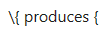
Using the HTML code:
&_#123;instead of the curly brace:

Which looks like this:
CustomProperties=AccountID={accountID};RoleID={RoleID};Uppercase=1;StaticSchema=1;OAuth2Token={connection string value}
Enclose it in a code block:

Which looks like this:

I chose to enclose it in a code block.
After correcting these two files and running the check I get:
C:\Blog>npx docusaurus-mdx-checker
[SUCCESS] All 13 MDX files compiled successfully!
Updating Docusaurus
This is the point I learned that I do not know as much as I need to if I have a platform that uses React, npm, etc. So, it took a little research to find out how the pieces work for my needs.
I thought it was as simple as running npm upgrade or npm update and it would update the whole project to the latest version. I realize now that it would not be a good method if your project broke depending on what version each package was upgraded to. I needed to learn more about Semantic Versioning, the package.json file, and the package-lock.json file. I had the package.json file and package-lock.json file in source control so I could always revert the change if I ran into a problem. I do not have the folder node_modules in source control since it can be recreated.
This is the point where I was not exactly sure how to do the upgrade. Upon further reading, I realized I had two choices of how to do the upgrade.
Manual Update
One is to manually update the package.json file with at least the version listed. The Docusaurus documentation has a section on upgrading dependencies. It shows the package.json file with the differences before and after the upgrade.
You can also run:
npm outdatedThis will give you a list of all the packages and the current version. You can use this information to update the package.json file to the versions you want. This has the advantage of not updating third party packages until you are ready. You can do the upgrade on just the Docusaurus dependencies and once you have verified everything looks good you can then do things like the font packages or dotenv.
Then you still need to run:
npm installAt this point I ran into some dependency errors. I decided to follow the steps you would use before submitting a bug for Docusaurus. I deleted the package-lock.json file and the node_modules folder and ran the installer again:
npm installThere are multiple ways listed on how to deal with the dependency errors, but I am a solo developer and this method worked for me.
Automatic update
For this method you need to install npm-check-updates:
npm install -g npm-check-updatesOr you can run it with npx:
npx npm-check-updatesThen you can run npm-check-updates or the alias ncu.
If you run it without any parameters, it will report back what the newest version of each package is. As this point you could use these version numbers and still go back and manually edit the package.json file with the newest version. As time goes on the listing on the Docusaurus site is not going to have the latest versions listed. For example, at the time of this writing @docusaurus/core is already up to 3.1.1.
Running ncu
C:\Blog>ncuChecking C:\blog\package.json[====================] 18/18 100% @docusaurus/core ^2.4.1 → ^3.1.1 @docusaurus/module-type-aliases ^2.4.1 → ^3.1.1 @docusaurus/plugin-google-gtag ^2.4.1 → ^3.1.1 @docusaurus/plugin-ideal-image ^2.4.1 → ^3.1.1 @docusaurus/preset-classic ^2.4.1 → ^3.1.1 @fortawesome/fontawesome-svg-core ^6.2.1 → ^6.5.1 @fortawesome/free-brands-svg-icons ^6.2.1 → ^6.5.1 @fortawesome/free-regular-svg-icons ^6.2.1 → ^6.5.1 @fortawesome/free-solid-svg-icons ^6.2.1 → ^6.5.1 @giscus/react ^2.2.6 → ^2.4.0 @mdx-js/react ^1.6.22 → ^3.0.1 clsx ^1.2.1 → ^2.1.0 dotenv ^16.0.3 → ^16.4.4 giscus ^1.2.0 → ^1.4.0 prism-react-renderer ^1.3.5 → ^2.3.1 react ^17.0.2 → ^18.2.0 react-dom ^17.0.2 → ^18.2.0Run ncu -u to upgrade package.jsonI can use this information to manually update the package.json with the new version numbers. This method may be preferred if you only want to update certain packages.
If you run ncu -u then it will make the changes in the package.json for you. The negative to doing it this way is you are upgrading everything at once including third party packages that you may be using in your project.
git diff package.json
  "dependencies": {
-    "@docusaurus/core": "^2.4.1",
-    "@docusaurus/preset-classic": "^2.4.1",
+    "@docusaurus/core": "^3.1.1",
+    "@docusaurus/preset-classic": "^3.1.1",
...
-    "react": "^17.0.2",
-    "react-dom": "^17.0.2"
+    "react": "^18.2.0",
+    "react-dom": "^18.2.0"
}
...
Once you are satisfied with the changes in the dependencies you still need to install the packages.
npm installEven using this method I still needed to remove the package-lock.json file before I was able to install the packages due to dependency issues.
Prism Syntax Highlighter
The React Prism Renderer has been upgraded to version 2.0+. You can find more details here: Prism-React-Renderer v2.0
I had this code in my docusaurus.config.js file:
docusaurus.config.js
const lightTheme = require('prism-react-renderer/themes/dracula');
const darkTheme = require('prism-react-renderer/themes/dracula');
Once I upgraded Prism to 2.0+ and tried to run Docusaurus I received an error message “Cause: Cannot find module ‘prism-react-renderer/themes/dracula'”.
This is easily remedied by changing a couple lines in the configuration file.
docusaurus.config.js
const {themes} = require('prism-react-renderer');
const lightTheme = themes.dracula;
const darkTheme = themes.dracula;
These variables are used later in the file to set the theme for prism.
docusaurus.config.js
      prism: {
        theme: lightTheme,
        darkTheme: darkTheme,
            additionalLanguages: ['bash', 'dax', 'json']
      },
Broken link to included languages
One of my blog posts had a link to the included languages in the syntax highlighter. This is no longer an accurate link and here is the link to the new list of default included languages. The list of languages included by default has shrunk.
If you were using one of the languages that is not included by default you will need to add it to the additional languages setting.
   prism: {
    //...
      additionalLanguages: ['bash', 'dax', 'csharp', 'powerquery']
   },
Conclusion
Docusaurus is a great website generator, especially for documentation. While writing this blog post I was going to the official documentation that is created with Docusaurus a great deal and I love that you can switch between the different versions of the documentation. The blog feature is a nice addition so that you can have a blog accompany your product documentation. But for just a blog from someone who is not a web developer it may be a little more than I need. I always learn a lot when building a blog using a static site generator. One of the benefits of maintaining the source code in GitHub is that I learn more about branching, logs, merging and comparing differences in files. Nothing reinforces concepts more than having an actual project that depends on using what you have learned. As Power BI gets more new features around source control, I know the time spent learning Git has already paid off. On some of the more web development topics it is hard to gauge if that time would be better spent on a new feature in Microsoft Fabric or Microsoft Power BI. I know that it has kept my troubleshooting skills sharp.
 The DAX Shepherd
You must be logged in to post a comment.